Estimates and invoices
How to turn an accepted project estimate into an invoice without re-entering scope
Call convert_estimate_to_invoice with the estimate id. Billr claims the estimate, copies its line items onto a new draft invoice, marks the estimate converted and links the two records. If the estimate was already converted, the same call returns the invoice that exists rather than creating a second one. The invoice is still a draft, so sending stays a separate step.
Written and reviewed by the Billr team. Published , last reviewed .
The short version
A draft invoice carrying the accepted scope line for line, with the estimate marked converted and a link back to the invoice it produced.
What you need first
- The estimate exists in Billr with its line items and was accepted by the client.
- You know the issue date and, if it differs from the business default term, the due date for the invoice.
- An agent key with the Read and draft profile so the conversion can be requested from the session.
Cautions
- A declined or expired estimate is refused. Billr will not quietly invoice something the client turned down.
- Conversion is not approval: it writes a draft, and a person still decides what actually goes out.
- Conversion copies the whole accepted scope. A deposit or a staged bill is a separate invoice, not a partial conversion.
Who this is for: Freelancers and studios who quote fixed-scope project work up front and invoice it once the client accepts.
list_estimatesget_estimateconvert_estimate_to_invoiceupdate_draft_invoicecreate_invoice
Why retyping the scope is the expensive part
The project is agreed. The scope lives in a quote the client already read and accepted, with a weekly rate, an audit line and an amount of launch support. Then invoicing time arrives and someone rebuilds that list by hand in a second document.
That is the step where drift happens. A line gets retyped as an approximate figure, a discount is silently dropped, or the total changes by a few hundred dollars because the rounding was recomputed rather than carried. Both documents describe the same agreement, so they should not be able to disagree.
Billr keeps estimates and invoices as separate records with their own numbering, and conversion is the one operation that moves scope from the first into the second. After it, the estimate reads "converted" and points at the invoice, and the invoice carries the same lines.
What carrying an estimate forward actually moves
Step 1
Draft
The quote exists and is being shared.
Step 2
Sent
The quote exists and is being shared.
Step 3
Viewed
The quote exists and is being shared.
Step 4
Accepted
The client agreed the scope and the total.
Conversion
One call claims the estimate and writes the lines
Line items are copied from the accepted scope. A retry returns the same invoice instead of a second one.
Estimate after
Status: converted
It keeps its own number and points at the invoice it produced.
Invoice after
Draft, ready for review
Amounts carried over. Sending is still a separate decision.
Confirm which quote was actually accepted
Start by reading the estimate rather than trusting memory. list_estimates returns quotes with their status, total and the invoice id if one was already produced; get_estimate returns the full record including the line items and the client.
Statuses matter for what happens next. accepted is the state you want. Sent and viewed mean the client has the quote but has not formally accepted it in Billr, and conversion will still work while the summary tells you the estimate was not formally accepted. declined and expired are refused outright. converted means an invoice already exists. If the client has not replied yet, send the estimate and wait for that recorded acceptance instead.
list_estimates, then get_estimate
list_estimates  { "status": "accepted", "client_id": "9f2a4d18-3b7c-4a6e-8f0d-1c5b2e9a7d44" }
get_estimate    { "estimate_id": "a41d7e93-2c68-4b05-8f71-3e9a5c1d7b26" }
Ask for accepted quotes for one client, then read the one you mean. Reading first keeps a stale or superseded quote from being invoiced.
Estimates and their statuses
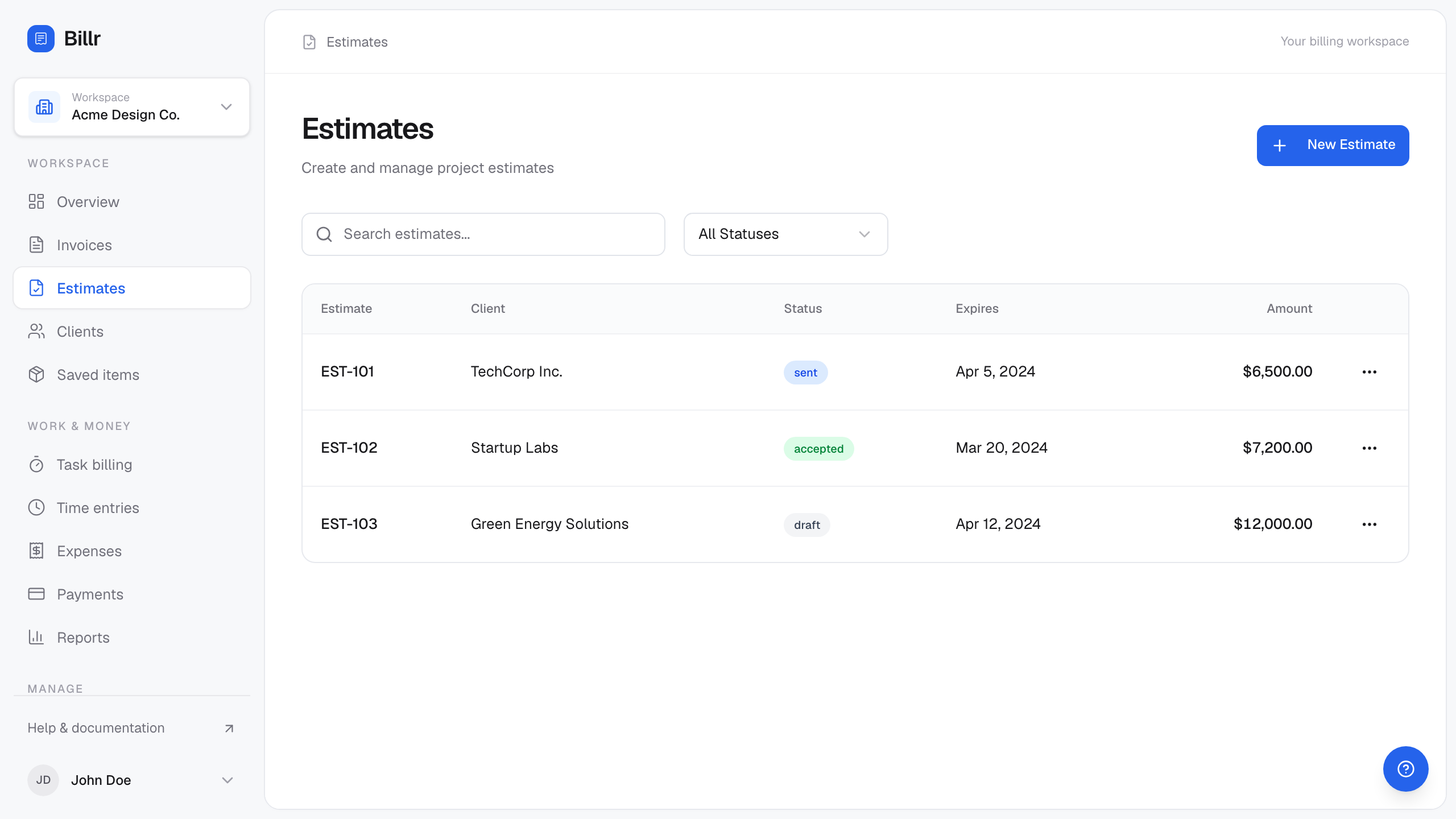
Billr demo data, fictional throughout. View full size
Convert it in one call
One call does the whole move: convert_estimate_to_invoice takes the estimate id plus the two dates, then claims the estimate, allocates the next invoice number, writes the invoice and its line items, and links everything together inside a single transaction.
Because the claim happens first, a retried request cannot produce a second invoice. If another call already converted the estimate, this call writes nothing and returns the existing invoice with already_converted: true, which is a success rather than an error.
convert_estimate_to_invoice
convert_estimate_to_invoice  {
  "estimate_id": "a41d7e93-2c68-4b05-8f71-3e9a5c1d7b26",
  "issue_date": "2026-09-21",
  "due_date": "2026-10-21"
}
Due date here is the issue date plus the business payment term of 30 days. Omit both dates to use today and that same term.
Fictional account, field names as returned by the server
You say
Convert the accepted estimate for Harbor & Lane into a draft invoice.
Your agent calls
convert_estimate_to_invoice{ "estimate_id": "a41d7e93-2c68-4b05-8f71-3e9a5c1d7b26", "issue_date": "2026-09-21", "due_date": "2026-10-21" }
Arithmetic you can check
- 1 x $900.00 + 3 x $1,200.00 + 1 x $500.00$5,000.00
- issue 2026-09-21 + 30 days2026-10-21
What came back
Response from convert_estimate_to_invoice. The line items are the scope that was agreed rather than a re-typed copy, and already_converted is false for the call that actually wrote it. The invoice is a draft: it becomes money owed when it is sent.
- summary
- Converted estimate EST-1042 into draft invoice INV-1152: $5,000.00. Call send_invoice to deliver it.
- already_converted
- no
- invoice
- 10 fields
- estimate
- 4 fields
- app_url
- /invoices/6b1f0c62-6a0f-4f38-9d0e-3a1f9a2b7c11
Show the raw response
{
  "summary": "Converted estimate EST-1042 into draft invoice INV-1152: $5,000.00. Call send_invoice to deliver it.",
  "already_converted": false,
  "invoice": {
    "id": "6b1f0c62-6a0f-4f38-9d0e-3a1f9a2b7c11",
    "invoice_number": "INV-1152",
    "status": "draft",
    "issue_date": "2026-09-21",
    "due_date": "2026-10-21",
    "currency": "USD",
    "subtotal": 5000,
    "total": 5000,
    "balance_due": 5000,
    "line_items": [
      {
        "description": "Discovery and technical audit",
        "quantity": 1,
        "rate": 900
      },
      {
        "description": "Implementation sprint (weekly)",
        "quantity": 3,
        "rate": 1200
      },
      {
        "description": "Launch support",
        "quantity": 1,
        "rate": 500
      }
    ]
  },
  "estimate": {
    "id": "a41d7e93-2c68-4b05-8f71-3e9a5c1d7b26",
    "estimate_number": "EST-1042",
    "status": "converted",
    "converted_invoice_id": "6b1f0c62-6a0f-4f38-9d0e-3a1f9a2b7c11"
  },
  "app_url": "/invoices/6b1f0c62-6a0f-4f38-9d0e-3a1f9a2b7c11"
}
Check what actually carried over
- Line items and totals: the invoice copies the estimate lines, so the amounts should match the accepted quote exactly.
- Dates: issue date and due date are on the invoice, not the estimate, and they come from the call or from the business default term.
- Currency: invoices and their source work must agree on currency. Billr does not convert between them.
- Numbers: the estimate keeps its own number, the invoice gets the next invoice number, and both records link to each other afterwards.
If the dates are wrong, fix the draft with update_draft_invoice rather than converting again. If the scope genuinely changed after acceptance, amend the draft lines and note why, or issue a separate change-order invoice for the new work. What you should not do is convert a second time and end up with two drafts describing one agreement.
The estimate is a quote, not a receivable
Estimates never carry a balance and never appear in revenue totals. Conversion produces a draft invoice, and drafts are excluded from those totals too. The money becomes owed when the invoice is sent.
One detail is easy to miss: nothing about the invoice changes just because the scope was agreed. The convert an accepted estimate guide follows the same call, and correcting the draft is the step that makes the numbers match what the client actually owes today.
Deposits and staged billing need their own invoice
Plenty of projects are not billed in one go: a deposit up front, a milestone on delivery, the balance on acceptance. Conversion copies the whole accepted scope into one invoice, so it is the wrong tool for taking a third of it.
For a deposit or milestone, draft an invoice for that stage with create_invoice and a hand-written line_items entry that names the stage. Keep the estimate unconverted until the final invoice, or convert it for the closing balance.
If you convert after part of the work was already invoiced, conversion does not subtract anything. It copies every line from the quote, and adding a note does not change the amount. Reconcile the draft yourself before it is sent: total the amounts already invoiced against this quote, then replace the draft lines so the invoice covers only what is still outstanding.
| Figure | Amount | Where it comes from |
|---|---|---|
| Agreed quote EST-1042 | $5,000.00 | The accepted estimate total |
| Already invoiced | $1,500.00 | Deposit invoice INV-1130 |
| Still to bill | $3,500.00 | What the converted draft should total after you reconcile it |
update_draft_invoice, reconciled to the unbilled remainder
update_draft_invoice  {
  "invoice_id": "6b1f0c62-6a0f-4f38-9d0e-3a1f9a2b7c11",
  "line_items": [
    { "description": "Implementation sprint (weekly), less deposit already invoiced", "quantity": 1, "rate": 3500 }
  ],
  "notes": "Balance of EST-1042. Deposit of $1,500.00 was billed on INV-1130."
}
Replacing the lines is what changes the amount; the note is only context for the client. Only draft invoices can be edited this way, so reconcile before sending, not after.
| Shape | What to do |
|---|---|
| Whole accepted scope, one invoice | convert_estimate_to_invoice, then review the draft. |
| Deposit or milestone | create_invoice with a descriptive line item, and leave the estimate unconverted. |
| Closing balance against the accepted quote | Convert the estimate, then subtract everything already invoiced before sending. |
| Change order after acceptance | A new estimate for the added scope, so both records stay honest. |
Limits and the things that trip people up
- Declined, expired and already-converted estimates are the three states that change the outcome, and only the last one is not an error.
- An estimate with no line items cannot be converted. There would be nothing to invoice.
- The conversion copy is one invoice, so there is no partial conversion tool.
- Conversion does not send anything. Delivery is
send_invoice, or the Send action in the app, and it is the step that needs explicit permission.
A non-accepted quote converts with a note
If the client said yes in an email but the estimate is still sent or viewed, conversion works and the summary records that it was not formally accepted. If your process requires a recorded acceptance, send the estimate and wait for that state first.
Frequently asked questions
- What happens if the conversion call is retried after a timeout?
- The estimate can only be claimed once. The retry finds it already converted, writes nothing, and returns the invoice that exists with
already_converted: true. You do not need to guard against duplicates yourself. - Can I convert an estimate the client has not formally accepted?
- Yes, as long as it is not declined, expired or already converted. The response summary notes that the estimate was not formally accepted, so the record shows the difference.
- Does conversion send the invoice?
- No. It creates a draft. Sending is
send_invoicefrom an agent with the sending permission, or the Send action in the app. - Can I invoice only part of an accepted estimate?
- Not through conversion, which copies the whole scope. Draft a separate invoice for the deposit or milestone with hand-written lines, and keep the estimate for the final billing step.
- Where do I see that an estimate was already used?
- The estimate status becomes
convertedandconverted_invoice_idpoints at the invoice it produced.list_estimatesshows both so a converted quote is obvious at a glance.
Guides and docs for the individual steps
Each article covers a whole job. These are the narrower references behind it.
Sources
Reviewed 2026-09-20 against Billr's own tool implementations and the pages linked here.
A quote is only useful once it can be sent and accepted. The estimate guide covers the client-facing step from first draft to acceptance.
Read the estimate guideEvery example on this page uses a fictional account. Field names come from Billr's own tool implementations, and the arithmetic is recomputed by the same helpers the server uses. All articles.