Month end and reconciliation
How to close out monthly client billing without missing unbilled hours or expenses
Work the month in one order: read list_unbilled to the end and resolve anything missing a rate or a client, draft one invoice per client and currency, review what is late with list_invoices, then read revenue_summary for the period. Draft and cancelled invoices are excluded from revenue totals, so the number you finish with is money actually invoiced.
Written and reviewed by the Billr team. Published , last reviewed .
The short version
Every client billed for the month, nothing billable left unread, and a per-currency revenue figure you can reconcile against the invoices themselves.
What you need first
- Work logged through the month, either from agent sessions or from the app.
- One clear decision about when the month ends for billing, so late entries land in the right period.
- A key with the Read and draft profile for the reading and drafting steps.
Cautions
list_unbilledtotals cover one page. If the response carriestruncated: true, ornext_offsetis not null, you have not seen everything yet.- Totals are never combined across currencies. A business billing in USD and EUR has two sets of numbers, on purpose.
- Draft invoices are excluded from revenue totals until they are sent. A draft is a plan, not a receivable.
Who this is for: Freelancers and small studios who bill several clients a month and want the close to be repeatable rather than a scramble.
list_unbilledupdate_time_entryupdate_expensecreate_invoicelist_invoicesrevenue_summary
Five questions, asked in this order
A month-end close is not one task, it is five questions asked in an order that makes each answer trustworthy. What is unbilled? Does any of it have nowhere to go? What should be drafted from it? What is late from earlier months? What does the ledger say the month came to?
The order matters because later questions depend on earlier answers. Revenue totals count invoices that have already been issued and exclude the drafts you are about to write, so reading them first answers a different question. Drafting before resolving unassigned work leaves billable time behind. Doing the late-invoice review last, rather than first, keeps reminders from going out on work you have not finished billing.
A month-end close that ends in a known number
Step 1
Read every unbilled page
Keep paging until next_offset is null, so no group is missed.
Step 2
Resolve unassigned work and missing rates
Assign a client, set the rate, or park the entry as non-billable.
Step 3
Draft one invoice per client and currency
Source work is claimed as the draft is written, once.
Step 4
Check what is late
Read the unpaid list and the payment history before any reminder.
Step 5
Read the month in the ledger
Invoiced, paid, outstanding and overdue, per currency.
Excluded from the final number: drafts, cancelled invoices, and anything nobody logged in the first place.
Read the unbilled list to the end
list_unbilled groups billable time and expenses that are not yet attached to an invoice, by client and currency, and totals each group. The response is paged at 500 rows of time and 500 rows of expenses, and the totals describe the page you asked for.
That last detail is what keeps a close honest. Keep passing next_offset back as offset until it returns null. If either collection filled its page, the response also sets truncated: true and the summary says so, which means the groups you can see are a partial picture.
One thing the tool does not do is filter by month. Every entry comes back with its own date, including work logged in earlier months that was never billed. Selecting the rows you want is a reading step: collect the entries whose date falls inside the month you are closing, note what is older than that, and decide whether this month pays for the carryover or whether it stays for a later conversation.
list_unbilled, paging through the month
list_unbilled  { "business_id": "b1f2c3d4-5e67-4a89-9b01-2c3d4e5f6a7b" }
list_unbilled  { "business_id": "b1f2c3d4-5e67-4a89-9b01-2c3d4e5f6a7b", "offset": 500 }
Repeat the second call with each new next_offset until the field is null. Keep the filters unchanged between pages.
| Signal | What it means | What to do |
|---|---|---|
missing_rate: true | Time was logged before a rate existed, so nothing is priced for it yet. | update_time_entry to set the agreed rate, or mark the entry non-billable if it should not be charged. |
unassigned | Billable work with no client. It cannot be grouped into a client invoice. | Assign a client with update_time_entry or update_expense, or accept that it is not billable this month. |
truncated: true | The page hit its row cap, so the totals are partial. | Keep paging with next_offset before you draft anything. |
Draft one invoice per client and currency
Work through the client groups and draft an invoice for each. Passing time_entry_ids and expense_ids prices the source work and links it in one atomic step, so the entries cannot be billed again by a later invoice.
A client group is keyed on client and currency together, which is why a client billed in two currencies appears twice. Do not merge those groups onto one invoice: create_invoice refuses source work in a currency other than the invoice currency rather than inventing a conversion.
Read every page before this step. Once an entry is attached to a draft it leaves the unbilled list, so a filter or a page you have not read yet is the easiest way to bill an incomplete month. If you do find something after drafting, bill a month of logged work covers the follow-up: correct the draft while it is still a draft.
create_invoice, once per group
create_invoice  {
  "request_id": "d5a1c8f3-6b29-4e47-9c15-8f3a2d6b1e90",
  "client_name": "Harbor & Lane",
  "time_entry_ids": ["3f6c1a44-5b2d-4e71-9c08-7a1d3f5b9e22"],
  "expense_ids": ["5e2b8d31-7a4c-4f09-8d6b-1a3e5c7d9f02"]
}
create_invoice  {
  "request_id": "9b4e7c25-1d38-4a60-8f92-5c7e3b1a6d48",
  "client_name": "Northwind Type Co.",
  "currency": "EUR",
  "time_entry_ids": ["8a1f4c72-6d35-4b90-9e28-1c7a5f3d6b04"]
}
The second client is billed in EUR, so its own invoice carries that currency. Every invoice is written as a draft.
Drafts are the plan for the month
Nothing is sent from this step. Review each draft, correct what needs correcting, and send deliberately. If a draft turns out to be wrong, delete it rather than starting a second one; deleting releases the source work so it can be billed again.
Check what is late, before you write a reminder
Now look backwards. list_invoices accepts the synthetic status unpaid, which matches invoices that are sent, viewed, partial or overdue, and every row comes back with is_overdue already evaluated from its status and due date.
Reading this before reminders is what stops the two most common mistakes: chasing a draft that was never sent, and chasing an invoice that was paid this morning through a channel you have not recorded yet. Older months show up here too, which is why the unpaid list, not the revenue report, is where follow-up work lives. The review overdue invoices guide covers what to do with each row.
Invoices with their real state
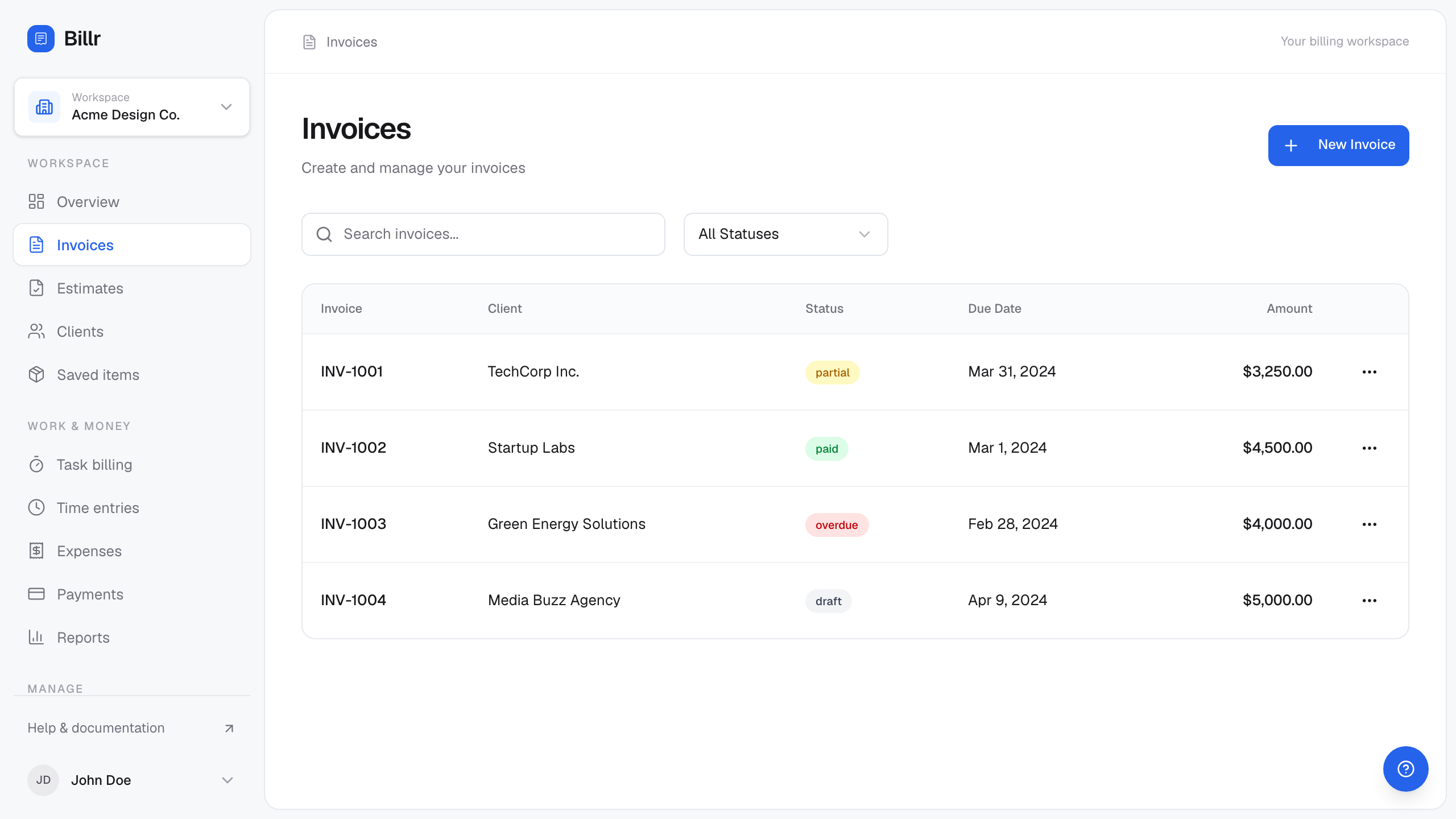
Billr demo data, fictional throughout. View full size
list_invoices, unpaid only
list_invoices { "status": "unpaid", "limit": 50 }Add client_id to narrow the list to one client, or page with offset to read further back.
Finish on a 2026-09 number that comes from the ledger
The last step is a check, not a guess. revenue_summary reports invoiced, paid, outstanding and overdue totals for this month, last month, this year or all time, with status counts and a top-five client breakdown.
Two details decide whether the number means what you think it means. Draft and cancelled invoices are excluded, so a draft you just wrote is not in the totals yet. And the period filters on the invoice issue date, not the payment date, so this is money invoiced in the month rather than cash that arrived during it. If you want cash, record the payments and read the payment history instead.
When a business bills in more than one currency, the response switches to a per-currency breakdown instead of a single combined number, because adding EUR to USD would be meaningless.
Fictional account, field names as returned by the server
You say
What did we invoice in 2026-09, and how much of that is still owed?
Your agent calls
revenue_summary{ "period": "this_month" }
Arithmetic you can check
- INV-1141 issued 2026-09-01 for $1,450.00$1,450.00 invoiced in USD this month
- INV-1141 with nothing recorded against it$1,450.00 outstanding in USD
- INV-1146 issued 2026-09-14 for €550.00€550.00 invoiced in EUR, reported separately
What came back
Abridged response from revenue_summary with period this_month, for a business billing in USD and EUR. The draft invoice of $300.00 is excluded from every total, and the two currencies are never added together.
- summary
- this month (mixed currencies): $1,450.00 invoiced; €550.00 invoiced.
- period
- this_month
- currency
- none
- invoiced_total
- none
- paid_total
- none
- outstanding_total
- none
- overdue_total
- none
- by_currency
- 2 entries
- by_status
- 1 field
- top_clients
- 0 entries
Show the raw response
{
  "summary": "this month (mixed currencies): $1,450.00 invoiced; €550.00 invoiced.",
  "period": "this_month",
  "currency": null,
  "invoiced_total": null,
  "paid_total": null,
  "outstanding_total": null,
  "overdue_total": null,
  "by_currency": [
    {
      "currency": "USD",
      "invoiced_total": 1450,
      "paid_total": 0,
      "outstanding_total": 1450,
      "overdue_total": 1450,
      "top_clients": [
        {
          "name": "Harbor & Lane",
          "invoiced": 1450
        }
      ]
    },
    {
      "currency": "EUR",
      "invoiced_total": 550,
      "paid_total": 0,
      "outstanding_total": 550,
      "overdue_total": 0,
      "top_clients": [
        {
          "name": "Northwind Type Co.",
          "invoiced": 550
        }
      ]
    }
  ],
  "by_status": {
    "sent": 1
  },
  "top_clients": []
}
The month view leaves out anything issued earlier that is still unpaid: INV-1136 and INV-1129 were issued in earlier months, so they only appear when you read the ledger across all time or when you read the unpaid list. Run the same call with period: "all" when you want that reconciliation.
Fictional account, field names as returned by the server
You say
Now show me the same figures across every invoice.
Your agent calls
revenue_summary{ "period": "all" }
Arithmetic you can check
- $1,450.00 + $890.00 + $500.00 + $774.00 USD invoiced$3,614.00 invoiced
- $180.00 + $774.00 USD paid$954.00 paid
- $1,450.00 + $890.00 + $320.00 USD still owed$2,660.00 outstanding, all of it overdue
What came back
The all-time view of the same ledger. Older invoices are still open, which is exactly the difference between a month close and a reconciliation.
- summary
- all time (mixed currencies): $3,614.00 invoiced; €550.00 invoiced.
- period
- all
- currency
- none
- invoiced_total
- none
- paid_total
- none
- outstanding_total
- none
- overdue_total
- none
- by_currency
- 2 entries
- by_status
- 4 fields
- top_clients
- 0 entries
Show the raw response
{
  "summary": "all time (mixed currencies): $3,614.00 invoiced; €550.00 invoiced.",
  "period": "all",
  "currency": null,
  "invoiced_total": null,
  "paid_total": null,
  "outstanding_total": null,
  "overdue_total": null,
  "by_currency": [
    {
      "currency": "USD",
      "invoiced_total": 3614,
      "paid_total": 954,
      "outstanding_total": 2660,
      "overdue_total": 2660,
      "top_clients": [
        {
          "name": "Harbor & Lane",
          "invoiced": 2724
        },
        {
          "name": "Larkspur Audio",
          "invoiced": 890
        }
      ]
    },
    {
      "currency": "EUR",
      "invoiced_total": 550,
      "paid_total": 0,
      "outstanding_total": 550,
      "overdue_total": 0,
      "top_clients": [
        {
          "name": "Northwind Type Co.",
          "invoiced": 550
        }
      ]
    }
  ],
  "by_status": {
    "sent": 1,
    "viewed": 1,
    "partial": 1,
    "paid": 1
  },
  "top_clients": []
}
Limits of this routine
- Revenue totals come from invoices and recorded payments, and the period filters on the invoice issue date. A payment that arrived but was never recorded is still outstanding in the ledger, so record it if you want the figure to be true.
list_unbilledhas no date filter, so the month boundary is a selection you make from each entry'sdate. Older unbilled work is visible on every run until somebody bills it or marks it non-billable.- Currency conversion is not implemented. Per-currency reporting is the honest way to read a mixed ledger.
- A client group with no client attached is surfaced as unassigned work rather than silently billed to anyone.
- The month is an accounting shape you choose. Billr reports on issue dates and due dates; it does not decide when your month closes.
Two drafts is a duplicate waiting to be sent
If you drafted an invoice twice, delete the one you do not want from the app. Deleting an unsent draft releases the source work, and a released entry can be billed again, so nothing is stranded. Agent keys cannot delete invoices, so this is a human step.
Frequently asked questions
- How do I know the unbilled list was complete?
- Keep calling with the returned
next_offsetuntil it is null, and treattruncated: trueas an instruction to keep reading. Page totals describe only the page you asked for. - Why are my draft invoices missing from the revenue totals?
- Draft and cancelled invoices are excluded from invoiced, paid, outstanding and overdue totals. A draft becomes part of the numbers once it is sent.
- What happens to work with no client attached?
- It is excluded from client groups and reported in the
unassignedsection of the unbilled response, counted in the summary. Assign a client if it should be billed. - Can I get one combined total for a month billed in two currencies?
- No, and that is deliberate.
revenue_summaryreturns a per-currency breakdown when a business bills in more than one currency rather than summing amounts that are not comparable. - What is the fastest way to see what is late?
list_invoiceswithstatus: "unpaid"returns sent, viewed, partial and overdue invoices, each with anis_overdueflag computed from its status and due date.
Guides and docs for the individual steps
Each article covers a whole job. These are the narrower references behind it.
Sources
Reviewed 2026-09-20 against Billr's own tool implementations and the pages linked here.
The month-end guide in the docs walks the same routine with the individual tool calls, if you want to follow it step by step.
Read the month-end guideEvery example on this page uses a fictional account. Field names come from Billr's own tool implementations, and the arithmetic is recomputed by the same helpers the server uses. All articles.