Billing across sessions
How to invoice freelance software development across several coding sessions
Log each block of work and each project cost to the client as it happens, then read list_unbilled once before you invoice. It returns every billable time entry and expense that is not yet attached to an invoice, grouped by client and currency. Draft one invoice from that list, check the totals, and send it as a separate step.
Written and reviewed by the Billr team. Published , last reviewed .
The short version
One draft invoice for the client that accounts for every billable entry you logged, with each line traceable to the session that produced it.
What you need first
- The client exists in Billr with the rate you agreed, and a payment term long enough to match your contract.
- An agent connected to Billr with the Read and draft key profile, which covers recording work and drafting invoices.
- A decision about what you bill: time at an hourly rate, a flat amount per deliverable, or both on separate lines.
Cautions
- A time entry logged without a rate is not silently billed as zero.
list_unbilledflags it so you can confirm the rate first. - Drafting an invoice is not sending it.
create_invoiceonly ever writes a draft. - Work that has no client attached is excluded from the per-client groups and reported in
unassignedinstead.
Who this is for: Freelance developers and small studios who bill one client for work that arrived as several separate sessions, some of them weeks apart.
log_timelog_expenselist_unbilledcreate_invoicesend_invoice
Decide what the invoice is for before you draft it
Freelance development rarely arrives as one tidy block. A refactor happens in a Tuesday pairing session, a hotfix lands on a Thursday evening, and a client call three weeks later changes the scope again. If billing is the last step, you rebuild the month from memory and from chat logs, and that is where hours get dropped.
Treat the invoice as a report on work you already recorded, not as the place the record is created. Each session writes its own rows, and the invoice claims them once. That structure is what makes the bill defensible if the client asks what a line means.
Two questions settle most cases: does this work belong to this client, and does it belong on this invoice? Work with no client attached cannot be grouped into a client invoice at all, and work that a previous draft already claimed will not appear in the unbilled list again.
Three sessions, one invoice, one review
Logged as it happens
Session 1
2:15 pairing, 0:45 review
Logged as it happens
Session 2
1:30 release and hotfix
Logged as it happens
Session 3
0:30 client call, notes
One read, grouped
Unbilled list, by client and currency
Five hours and one project cost, still unattached to any invoice.
One draft
Draft invoice claims that work
The entries are priced and linked, so a later invoice cannot bill them again.
Human step
Review, then send as a separate action
Drafting and sending are different decisions on purpose.
Log the work in the session that produced it
The cheapest moment to record an hour is while the session is open. Ask the agent to log the block before you close the terminal, with the client, the date and what the work was.
log_time needs a request_id UUID, a client identified by client_id or an exact client_name, a description, and hours between zero and 24. The rate field is optional, and that matters: omitting it leaves the entry without a rate so it can be confirmed later, while passing 0 records a deliberate unpaid rate. The log time from an agent session guide walks one entry through end to end.
log_time, session 1
log_time  {
  "request_id": "2b7e4c19-5a3d-4f82-9c61-7d0b3e5a1f48",
  "client_name": "Harbor & Lane",
  "description": "Checkout refactor, live pairing",
  "date": "2026-09-08",
  "hours": 2.25,
  "rate": 150
}
One call for one block of work, shown in full. The example client is the small part of the contract; the other three entries behind the worked example use the same shape with their own request_id and hours.
A missing rate is not a zero rate
If you log hours before agreeing the rate, leave rate out. The entry shows up in list_unbilled with missing_rate: true and can be priced before invoicing. Passing rate: 0 tells Billr you meant to bill nothing for that time.
Short sessions add up, and they are the ones people forget. In the example below the client was billed for five hours across three sessions, which came from four separate entries rather than one rounded guess.
Attach project costs to the client as they happen
- Anything you bought specifically for this client goes in with that client attached: a licence, a stock asset, a paid font, a hosting add-on.
- Costs with no client default to non-billable, kept as an internal record and never offered to a client invoice. That is what you want for shared tooling and internal meals. Track a billable expense covers the opposite case.
- An expense that has already been attached to an invoice drops out of the unbilled list, so a rebill cannot quietly happen twice.
log_expense, same project
log_expense  {
  "request_id": "1a9f5d38-4b62-4c07-9e81-3f6a2d7c5b94",
  "client_name": "Harbor & Lane",
  "description": "Staging environment add-on",
  "amount": 24,
  "category": "software",
  "date": "2026-09-15"
}
An expense is billable by default only when a client is attached. With no client, it is recorded as a cost the business absorbs.
Logged time in the app
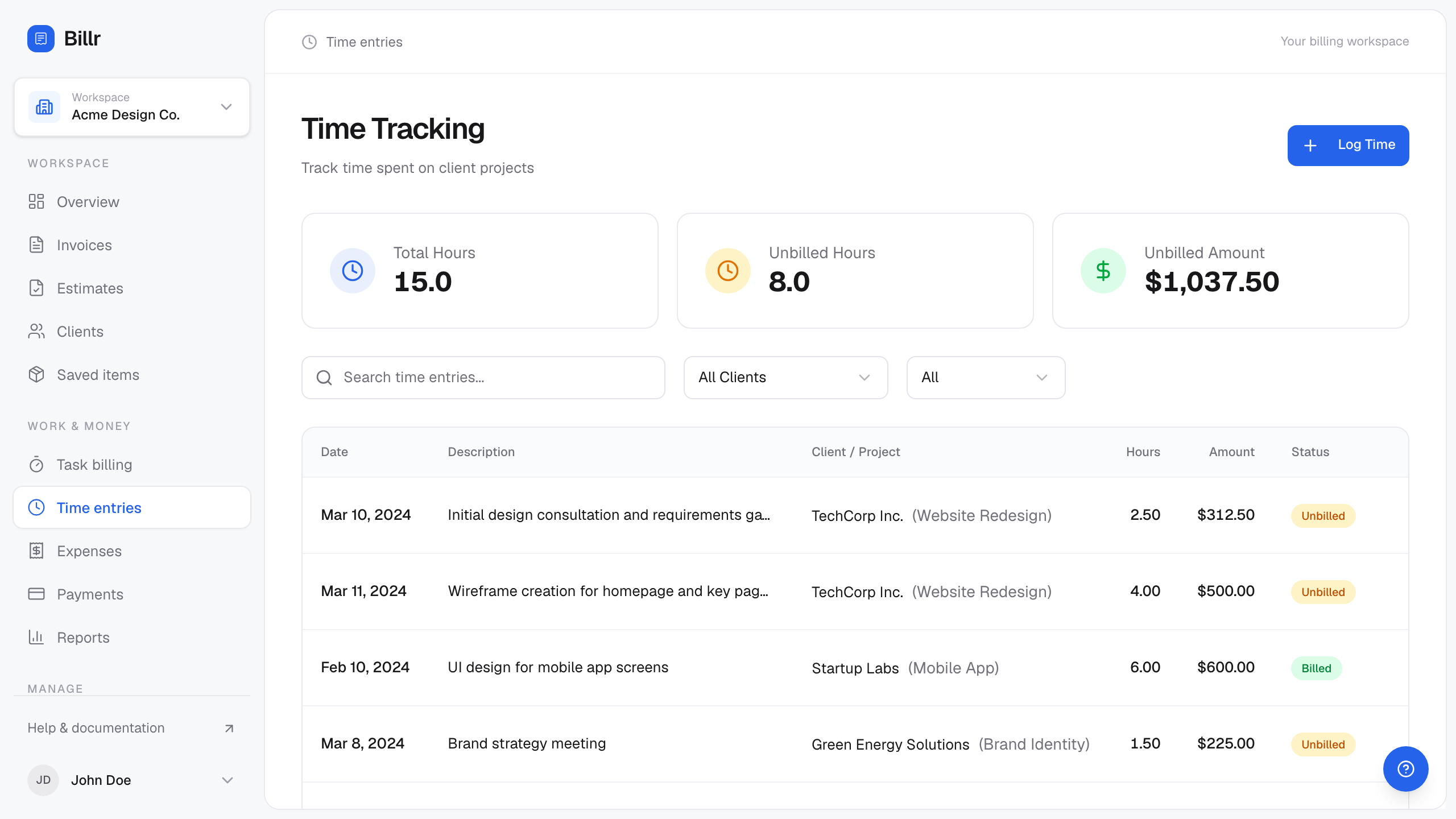
Billr demo data, fictional throughout. View full size
Read the unbilled list once, before you invoice
Before drafting anything, ask for the work that is not yet billed. list_unbilled returns billable time and expenses with no invoice attached, grouped by client and currency, with a total per group.
page_totals tells you the totals describe this page rather than the whole ledger, and next_offset is null when there is nothing further to fetch. If either collection hits its page cap the response carries truncated: true and the summary says so, which is your signal not to invoice from a partial picture. The find unbilled work before you invoice guide covers the same list with the flags explained one by one.
| Field | What to do with it |
|---|---|
clients[].time[] | One row per unbilled entry, with hours, rate, amount and missing_rate. |
clients[].expenses[] | Costs already attributed to that client, ready to rebill. |
clients[].total_unbilled | Time plus expenses for that client and currency, for this page. |
unassigned | Billable work with no client. It is counted in the summary but excluded from client groups. |
next_offset | Pass it back as offset to keep reading, or confirm it is null before invoicing. |
Fictional account, field names as returned by the server
You say
What is still unbilled for Harbor & Lane, and is anything missing a rate?
Your agent calls
list_unbilled{ "client_id": "9f2a4d18-3b7c-4a6e-8f0d-1c5b2e9a7d44" }
Arithmetic you can check
- 2.25 h + 0.75 h + 1.5 h + 0.5 h5 h across three sessions
- 5 h x $150.00$750.00
- $750.00 + $24.00 expense$774.00
What came back
Response from list_unbilled. The fictional entries are the four time blocks logged across the three sessions, plus the one project cost, all still unattached to an invoice.
- offset
- 0
- next_offset
- none
- page_totals
- yes
- summary
- 1 billing group has $774.00 unbilled
- clients
- 1 entry
Show the raw response
{
  "offset": 0,
  "next_offset": null,
  "page_totals": true,
  "summary": "1 billing group has $774.00 unbilled",
  "clients": [
    {
      "client_id": "9f2a4d18-3b7c-4a6e-8f0d-1c5b2e9a7d44",
      "client_name": "Harbor & Lane",
      "currency": "USD",
      "time": [
        {
          "id": "3f6c1a44-5b2d-4e71-9c08-7a1d3f5b9e22",
          "date": "2026-09-08",
          "description": "Checkout refactor, live pairing",
          "hours": 2.25,
          "rate": 150,
          "amount": 337.5,
          "missing_rate": false
        },
        {
          "id": "c2b7e4d9-8f30-4a51-9e6d-3b5a1c7f0d92",
          "date": "2026-09-08",
          "description": "Review of the payment retry path",
          "hours": 0.75,
          "rate": 150,
          "amount": 112.5,
          "missing_rate": false
        },
        {
          "id": "9a2d0b71-6c34-4f52-8e19-2b7c4d0a6f31",
          "date": "2026-09-15",
          "description": "Release cut and hotfix",
          "hours": 1.5,
          "rate": 150,
          "amount": 225,
          "missing_rate": false
        },
        {
          "id": "d41b8e93-2a70-4c15-9b6f-5e8a1c3d7f08",
          "date": "2026-09-19",
          "description": "Client call and scope notes",
          "hours": 0.5,
          "rate": 150,
          "amount": 75,
          "missing_rate": false
        }
      ],
      "expenses": [
        {
          "id": "5e2b8d31-7a4c-4f09-8d6b-1a3e5c7d9f02",
          "date": "2026-09-15",
          "description": "Staging environment add-on",
          "category": "software",
          "amount": 24
        }
      ],
      "total_unbilled": 774
    }
  ]
}
Draft one invoice from the source work
You have two ways to build the invoice. Pass time_entry_ids and expense_ids and Billr prices the source work and links it in one atomic step, or write line_items yourself when the work does not map cleanly onto entries.
Prefer the linked form for session work. It marks those entries as billed, produces one line per source item with the measured seconds in the description, and refuses entries that already belong to another invoice.
create_invoice, from logged work
create_invoice  {
  "request_id": "6e2b7f94-3c18-4d75-8a60-9b1e4c7d2f35",
  "client_name": "Harbor & Lane",
  "time_entry_ids": [
    "3f6c1a44-5b2d-4e71-9c08-7a1d3f5b9e22",
    "c2b7e4d9-8f30-4a51-9e6d-3b5a1c7f0d92",
    "9a2d0b71-6c34-4f52-8e19-2b7c4d0a6f31",
    "d41b8e93-2a70-4c15-9b6f-5e8a1c3d7f08"
  ],
  "expense_ids": ["5e2b8d31-7a4c-4f09-8d6b-1a3e5c7d9f02"]
}
This example bills source work only, so no line_items are needed: the entries determine the lines. A draft can also carry extra written lines next to linked work, which is how a handling fee or a discretionary discount gets added. The invoice currency defaults to the client currency, and source work in another currency is refused rather than converted.
Fictional account, field names as returned by the server
You say
Draft the September invoice from that unbilled work, then tell me the total.
Your agent calls
create_invoice{ "request_id": "6e2b7f94-3c18-4d75-8a60-9b1e4c7d2f35", "client_name": "Harbor & Lane", "time_entry_ids": [ "3f6c1a44-5b2d-4e71-9c08-7a1d3f5b9e22", "c2b7e4d9-8f30-4a51-9e6d-3b5a1c7f0d92", "9a2d0b71-6c34-4f52-8e19-2b7c4d0a6f31", "d41b8e93-2a70-4c15-9b6f-5e8a1c3d7f08" ], "expense_ids": [ "5e2b8d31-7a4c-4f09-8d6b-1a3e5c7d9f02" ] }
What came back
Abridged response from create_invoice. linked_time_entry_ids and linked_expense_ids are the receipt that the source work is now claimed by this draft.
- summary
- Drafted INV-1151 for Harbor & Lane: $774.00 Source work was priced and linked atomically.
- invoice
- 10 fields
- linked_time_entry_ids
- 4 entries
- linked_expense_ids
- 1 entry
- app_url
- /invoices/6b1f0c62-6a0f-4f38-9d0e-3a1f9a2b7c11
Show the raw response
{
  "summary": "Drafted INV-1151 for Harbor & Lane: $774.00 Source work was priced and linked atomically.",
  "invoice": {
    "id": "6b1f0c62-6a0f-4f38-9d0e-3a1f9a2b7c11",
    "invoice_number": "INV-1151",
    "status": "draft",
    "issue_date": "2026-09-20",
    "due_date": "2026-10-20",
    "currency": "USD",
    "subtotal": 774,
    "total": 774,
    "balance_due": 774,
    "line_items": [
      {
        "description": "Checkout refactor, live pairing (8100 seconds)",
        "quantity": 1,
        "rate": 337.5,
        "amount": 337.5
      },
      {
        "description": "Review of the payment retry path (2700 seconds)",
        "quantity": 1,
        "rate": 112.5,
        "amount": 112.5
      },
      {
        "description": "Release cut and hotfix (5400 seconds)",
        "quantity": 1,
        "rate": 225,
        "amount": 225
      },
      {
        "description": "Client call and scope notes (1800 seconds)",
        "quantity": 1,
        "rate": 75,
        "amount": 75
      },
      {
        "description": "Staging environment add-on",
        "quantity": 1,
        "rate": 24,
        "amount": 24
      }
    ]
  },
  "linked_time_entry_ids": [
    "3f6c1a44-5b2d-4e71-9c08-7a1d3f5b9e22",
    "c2b7e4d9-8f30-4a51-9e6d-3b5a1c7f0d92",
    "9a2d0b71-6c34-4f52-8e19-2b7c4d0a6f31",
    "d41b8e93-2a70-4c15-9b6f-5e8a1c3d7f08"
  ],
  "linked_expense_ids": [
    "5e2b8d31-7a4c-4f09-8d6b-1a3e5c7d9f02"
  ],
  "app_url": "/invoices/6b1f0c62-6a0f-4f38-9d0e-3a1f9a2b7c11"
}
Read the draft before it goes anywhere. The useful checks are short: is the client right, is the issue date the one you want, does the due date match your terms, and does the total match what you expected from the unbilled list. If something is wrong, correct the draft rather than starting over, and when it is right, send it as its own deliberate step.
Limits worth knowing before you rely on this
- Writing lines by hand instead of linking source work is fine, but those entries stay unbilled and will appear again next month.
- Time and expenses are grouped per currency and never converted. An invoice and its source work have to agree on the currency.
- Sending is a separate call with its own permission. A draft sitting in the app has not been delivered to anyone.
- If you already drafted the invoice and the numbers look wrong, correct the draft instead of creating a second one. Two drafts for one month is how a client ends up with a duplicate.
Check the date arithmetic
create_invoice defaults the due date to the issue date plus the business payment term. If the contract says 14 days and Billr says 30, fix the business default rather than editing every invoice.
Frequently asked questions
- Can I bill several sessions on one invoice even if they were weeks apart?
- Yes. Unbilled entries are grouped by client and currency regardless of date, so one draft can claim entries from different weeks. Pass every entry id you want on that invoice in
time_entry_ids. - What happens if I log time without a rate?
- The entry is stored with no rate and nothing is billed for it yet.
list_unbilledreturns it withmissing_rate: trueand the summary says how many entries need a rate, so you can set the rate before invoicing. - Do expenses need a client to reach an invoice?
- Yes. An expense with no client cannot be grouped into a client invoice, so it is recorded as a business cost instead. Add the client when you log it if the client should reimburse it.
- Will the same time entry be billed twice if I invoice twice?
- A draft claims the entries it prices. Once an entry is attached to an invoice it no longer appears in
list_unbilled, and a second call that tries to attach it is refused. - Is the invoice sent as soon as I draft it?
- No.
create_invoiceonly writes a draft. Sending happens throughsend_invoice, or from the app, and it needs a key with the sending permission.
Guides and docs for the individual steps
Each article covers a whole job. These are the narrower references behind it.
Sources
Reviewed 2026-09-20 against Billr's own tool implementations and the pages linked here.
You need a client before an agent can log anything to it. The same tools run against a hosted account and a self-hosted installation.
Add your first clientEvery example on this page uses a fictional account. Field names come from Billr's own tool implementations, and the arithmetic is recomputed by the same helpers the server uses. All articles.