Expenses and rebilling
How to track reimbursable project expenses and include them on a client invoice
Record each project cost with log_expense and attach the client when the client should reimburse it. Billable expenses appear in list_unbilled grouped by client and currency; non-billable ones never do. Draft the invoice with expense_ids and Billr prices those costs onto the invoice and attaches them, so a later invoice cannot rebill them.
Written and reviewed by the Billr team. Published , last reviewed .
The short version
Client costs clear in one place: marked billable with a client attached, priced onto one invoice, and no longer available to be rebilled by accident.
What you need first
- The client exists in Billr, so an expense can be attributed to it.
- A habit of recording the cost when it happens, with the category that matches what it was.
- A rule for what gets rebilled, agreed with the client before the cost lands.
Cautions
- An expense logged with no client defaults to non-billable, so it is absorbed. Marking it billable with no client makes it unassigned instead: visible in
list_unbilled, but not in any client group. - Expenses and invoices must agree on currency. Billr does not convert one into the other.
- A billed expense cannot be edited afterwards. If the invoice is still a draft, correct its lines before sending. Do not log a second expense to offset the first.
Who this is for: Freelancers and studios whose client work carries pass-through costs such as licences, assets, travel and hardware.
log_expenselist_expensesupdate_expenselist_unbilledcreate_invoiceupdate_draft_invoice
Decide the rule before the cost lands
Reimbursable costs are only simple when the rule is written down first: this client pays for assets bought for their project, this licence is shared across clients and stays with the business, travel is rebilled at cost, meals are not. Once the invoice exists, that decision is already made for you.
The rule maps onto billable and non-billable. A billable expense with a client attached is a cost waiting to be rebilled. A non-billable expense is a cost the business absorbs. A billable expense with no client sits in between: Billr cannot put it on a client invoice, so list_unbilled reports it as unassigned work rather than pretending it belongs to somebody.
That is the whole reason to record costs in the invoicing tool rather than a parallel spreadsheet. The spreadsheet and the invoice drift; a single record cannot.
Rebill or absorb, decided once
Recorded once
One project cost, logged with its category
The decision happens here, when the cost is still fresh.
Rebill path
Billable, with a client attached
- Appears in the unbilled list for that client.
- Priced onto a draft invoice from its id.
- Leaves the unbilled list once claimed.
Absorbed path
Non-billable, or no client attached
- Never offered to a client invoice.
- Still visible in the expense list for review.
- Can be moved across with one update, before invoicing.
Record the cost with the client attached
log_expense takes a request_id, a description, an amount, an optional date, a category and, when the cost is reimbursable, the client. Attaching the client is what makes the expense billable by default. Omit the client and billable defaults to false, so the cost is absorbed unless you explicitly pass billable: true.
Categories are a fixed list rather than free text: office, travel, meals, supplies, utilities, software, marketing, professional, insurance, mileage and other. Pick the closest one; the point is that a later review can find costs by kind. The track a billable expense guide covers the same call with the client added by id.
log_expense, reimbursable
log_expense  {
  "request_id": "4d7a2e69-8b31-4c05-9f82-3a6d1c7b4e58",
  "client_name": "Harbor & Lane",
  "description": "Client-specific stock imagery licence",
  "amount": 180,
  "category": "software",
  "date": "2026-09-11"
}
The client is named rather than passed by id here; both work, and a name has to match exactly (case-insensitively).
Expenses split by billability
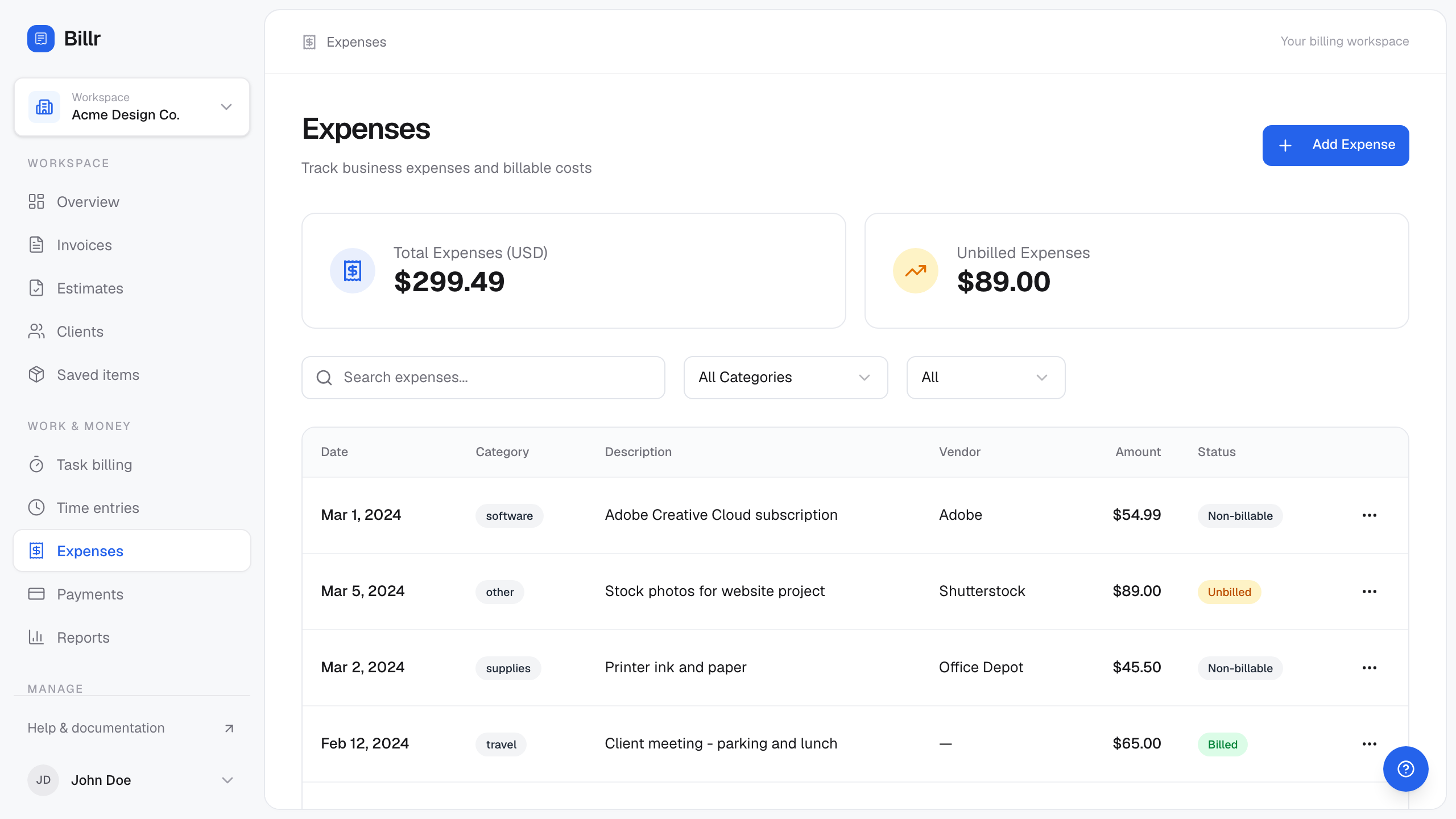
Billr demo data, fictional throughout. View full size
Keep absorbed costs out of the client invoice
- Shared tooling that serves every client belongs in the absorbed column, not in one client invoice.
- A cost logged without a client is absorbed already, because
billabledefaults to false in that case. Nothing further is needed. - If a cost starts as billable and turns out not to be,
update_expensewithbillable: falseremoves it from the unbilled list before it reaches an invoice. - If a cost was logged without a client and should be rebilled,
update_expensecan attach the client and mark it billable in the same call. If it is already marked billable but still has no client, it remains unassigned.
update_expense, moving a cost between the two paths
update_expense  {
  "expense_id": "a7d4e1b8-3c69-4f25-8e40-9b6a2d5c1f38",
  "billable": false
}
update_expense  {
  "expense_id": "e6a2d9c4-1f58-4b73-9c26-8d3a5e1b7f40",
  "client_id": "9f2a4d18-3b7c-4a6e-8f0d-1c5b2e9a7d44",
  "billable": true
}
The first call parks a shared tool seat. The second attributes a cost to the client that should carry it.
Billed costs freeze
Once an expense is attached to an invoice it can no longer be edited, because changing it would not change the invoice the client already received. If the invoice is still a draft, fix it there: update_draft_invoice replaces the line items, and a person can delete an unsent draft in the app, which releases the cost so it can be billed again. A sent invoice cannot be edited and Billr has no credit-note tool, so a correction after sending means a separate invoice or an arrangement outside Billr.
Verify before you rebill
Two reads answer the question. list_unbilled shows the costs that are billable, unbilled and attached to a client, grouped with the time for that client. list_expenses shows the full picture, including what has already been billed and what is being absorbed, with billed accepting billed, unbilled or all.
A cost missing from list_unbilled is not automatically an absorbed cost. There are four ordinary reasons it can be absent: it is non-billable, it is already attached to an invoice, your read was filtered or paged past it, or it is billable with no client and therefore reported in the unassigned section instead of a client group. Check which one applies before you conclude anything.
Pagination is the easy one to miss: both tools return next_offset when there is more to read, so a short list can simply mean you stopped early. The find unbilled work before you invoice guide walks the same grouping, and keeping costs separate covers what belongs on the business side.
reading costs before an invoice
list_unbilled  { "client_id": "9f2a4d18-3b7c-4a6e-8f0d-1c5b2e9a7d44" }
list_expenses  { "client_name": "Harbor & Lane", "billed": "unbilled", "from": "2026-09-01", "to": "2026-09-30" }
Dates are inclusive. Keeping a month filter makes the review a short list rather than a scroll through history; follow next_offset until it is null before you decide a cost is absent.
| State | Example cost | What it looks like |
|---|---|---|
| Non-billable, no client | Adobe Creative Cloud subscription ($54.99) | Logged with no client, so billable defaults to false: absorbed, not unassigned. |
| Billable, no client | Stock photos for website project ($89.00) | Explicitly billable with no client: it appears in the unassigned section rather than in a client group. |
| Billable, already invoiced | Client meeting: parking and lunch ($65.00) | Already attached to an invoice, so it is no longer offered to another one. |
| Non-billable by choice | Printer ink and paper ($45.50) | Deliberately absorbed: shared office cost, nobody to rebill it to. |
| Cost | Amount | Path |
|---|---|---|
| Client-specific stock imagery licence | $180.00 | Rebilled: billable with a client attached |
| Production asset drive | $96.50 | Rebilled: hardware bought for the project |
| Team lunch, internal planning | $62.00 | Absorbed: internal, not billable |
| Design tool seat, shared across clients | $45.00 | Absorbed: shared across clients |
Put the approved costs on the invoice
Pass the expense ids to create_invoice along with any time you are billing for the same client. The source costs are priced onto the invoice, written as line items, and attached in the same atomic step, which is what stops a second invoice from claiming them later.
Costs are rebilled at the amount you recorded. There is no automatic markup, so if your agreement includes a handling fee, add it as its own line_items entry with a description that explains it. Mixed invoices are fine: linked source work and hand-written lines can share one draft.
create_invoice with time, expenses and a handling line
create_invoice  {
  "request_id": "7f1c4a96-2e53-4b08-9d71-6a3e5c2b8f14",
  "client_name": "Harbor & Lane",
  "time_entry_ids": ["3f6c1a44-5b2d-4e71-9c08-7a1d3f5b9e22"],
  "expense_ids": ["b1e5c7a2-4d96-4f30-8a17-6c2b9e4d1f73", "e6a2d9c4-1f58-4b73-9c26-8d3a5e1b7f40"],
  "line_items": [
    {
      "description": "Expense handling fee",
      "quantity": 1,
      "rate": 25
    }
  ]
}
Time and expenses are linked from their records; the handling fee is a written line because it is your own charge, not a source cost.
Fictional account, field names as returned by the server
You say
Draft the invoice with the assets this project needed and the handling fee.
Your agent calls
create_invoice{ "request_id": "7f1c4a96-2e53-4b08-9d71-6a3e5c2b8f14", "client_name": "Harbor & Lane", "time_entry_ids": [ "3f6c1a44-5b2d-4e71-9c08-7a1d3f5b9e22" ], "expense_ids": [ "b1e5c7a2-4d96-4f30-8a17-6c2b9e4d1f73", "e6a2d9c4-1f58-4b73-9c26-8d3a5e1b7f40" ], "line_items": [ { "description": "Expense handling fee", "quantity": 1, "rate": 25 } ] }
Arithmetic you can check
- 4 h x $150.00$600.00
- $180.00 + $96.50 rebillable costs$276.50
- $876.50 + $25.00 handling fee$901.50
- $62.00 + $45.00 absorbed$107.00, not on any client invoice
What came back
Abridged response from create_invoice. The linked ids are the receipt that those two costs are now on this draft.
- summary
- Drafted INV-1154 for Harbor & Lane: $901.50
- invoice
- 6 fields
- linked_time_entry_ids
- 1 entry
- linked_expense_ids
- 2 entries
Show the raw response
{
  "summary": "Drafted INV-1154 for Harbor & Lane: $901.50",
  "invoice": {
    "invoice_number": "INV-1154",
    "status": "draft",
    "currency": "USD",
    "subtotal": 901.5,
    "total": 901.5,
    "balance_due": 901.5
  },
  "linked_time_entry_ids": [
    "3f6c1a44-5b2d-4e71-9c08-7a1d3f5b9e22"
  ],
  "linked_expense_ids": [
    "b1e5c7a2-4d96-4f30-8a17-6c2b9e4d1f73",
    "e6a2d9c4-1f58-4b73-9c26-8d3a5e1b7f40"
  ]
}
Limits and the mistakes worth avoiding
- Expenses are stored with their own currency and grouped per currency. A USD cost cannot be dropped onto a EUR invoice.
- Amounts are flat figures with no unit conversion, so mileage is recorded as the amount you are charging, not as a distance.
- Amounts must be greater than zero. There is no negative expense and no credit-note line, so a refund or a reversed cost is handled with a correction rather than a minus sign.
- Receipt files are not uploaded to Billr. Keep the paper trail wherever your accounting lives and use the notes field to describe where it is.
- Non-billable is not the same as invisible: an absorbed cost still appears in
list_expenses, which is what makes a profitability review possible later.
Duplicate avoidance is structural
A cost that an invoice has claimed leaves the unbilled list, and an invoice cannot attach an expense that already belongs to another one. Avoidance does not depend on you remembering.
Frequently asked questions
- Why does my expense not appear in the unbilled list?
- There are four ordinary reasons. The cost is non-billable, it is already attached to an invoice, your read was filtered or paged past it, or it is billable with no client, in which case
list_unbilledreports it underunassignedinstead of in a client group. - Can I rebill an expense with a markup?
- Expenses go onto the invoice at the amount you recorded, with no automatic markup. Add a separate line item for a handling fee or agreed uplift so the client can see what the charge is for.
- Can I change an expense after it has been invoiced?
- Not while it is attached. On a draft, replace the invoice lines with
update_draft_invoice, or delete the unsent draft in the app so the cost is released and can be billed again. A sent invoice cannot be edited and Billr has no credit-note tool, so a correction after sending means a separate invoice or an arrangement outside Billr. - What if the client uses a different currency from my business default?
- Expenses are recorded in a currency and grouped per currency. Attach a cost to an invoice in the same currency, or record the cost in the currency the client is billed in.
- Do I need to file receipts in Billr?
- Receipt uploads are not part of Billr. Use the description and notes to say what the cost was and where the proof lives, and keep receipts with your accounting records.
Guides and docs for the individual steps
Each article covers a whole job. These are the narrower references behind it.
Sources
Reviewed 2026-09-20 against Billr's own tool implementations and the pages linked here.
Once costs are attached to a draft, the invoice itself is the next thing to review. The month-end routine shows where that fits.
See the month-end routineEvery example on this page uses a fictional account. Field names come from Billr's own tool implementations, and the arithmetic is recomputed by the same helpers the server uses. All articles.